 DMediQ
Cloud · On-premise · Any device
Complete Hospital Management System
OPD, IPD, EMR, lab, pharmacy, billing and insurance — all in one cloud software for hospitals and clinics.
- Go live in 1–3 weeks
- Excel/CSV data import
- 76 countries · multi-currency
- Desktop, mobile & kiosk
Product suite
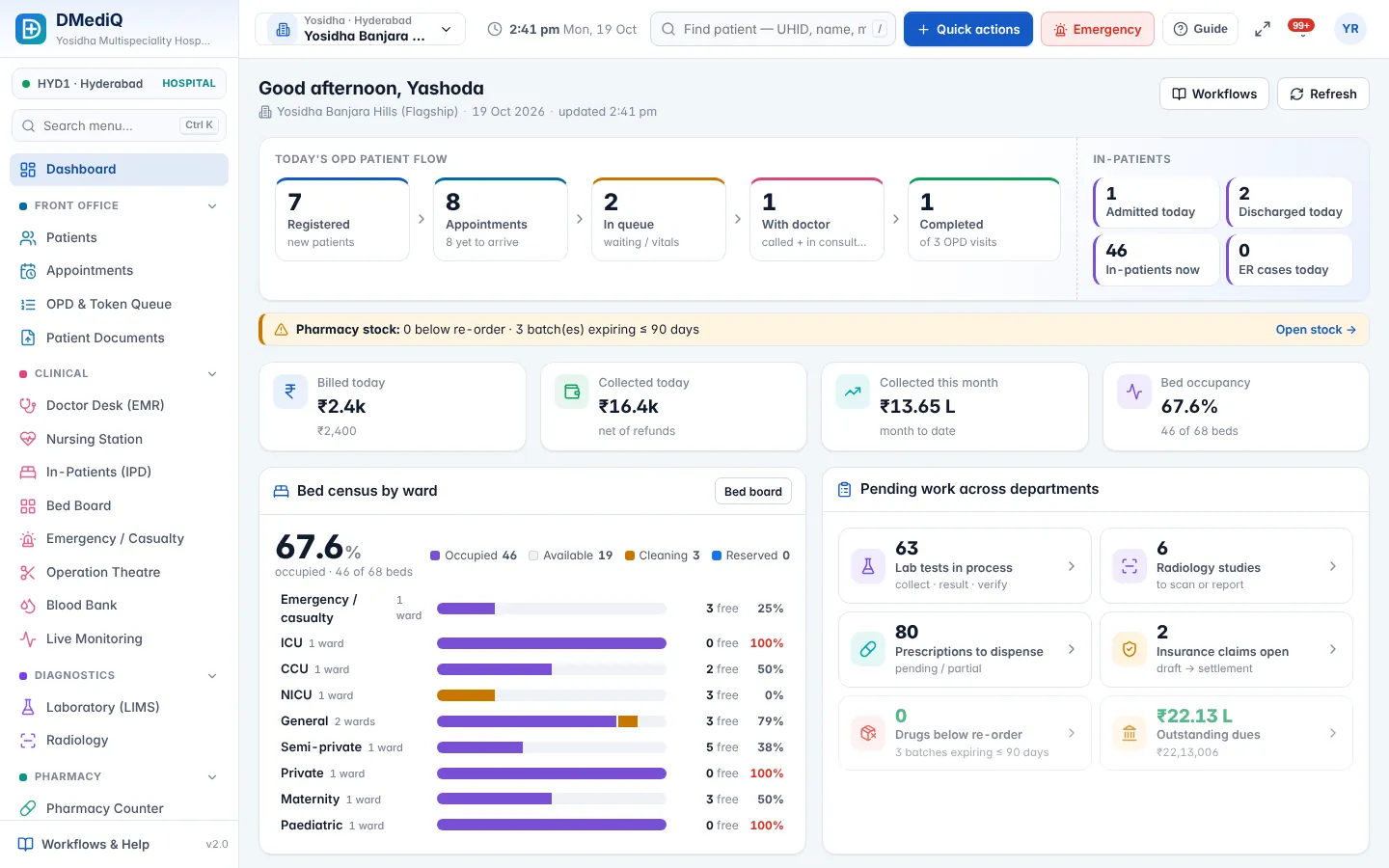
Everything your hospital needs, already connected
Use the full suite or start with the modules you need. Every module shares one patient record.
Hospital Management (HIS)
Run every department of your hospital on one connected platform — from the front desk to discharge, across one branch or fifty.
Learn moreOPD & Appointments
Book, check in, triage and call patients in order — with live doctor load and zero confusion at the front desk.
Learn moreEMR & Doctor Desk
Give doctors one screen with the full patient history, quick templates and e-prescriptions that print in seconds.
Learn moreIPD, OT & Emergency
See every bed, every surgery and every emergency case in real time — and discharge faster with complete bills.
Learn moreLaboratory (LIMS) & Radiology
From sample barcode to verified report — with reference ranges, critical alerts and secure report links for patients.
Learn morePharmacy & Inventory
Dispense straight from the doctor's prescription and never run out — or expire — again.
Learn moreBilling, Insurance & TPA
Every service billed, every claim tracked, every rupee — or dirham, or dollar — accounted for.
Learn moreLive Patient Monitoring
One central station for every monitored bed — with early-warning scores and alarms that nurses can't miss.
Learn morePatient Engagement
Keep patients informed automatically — in their language, on the channel they use.
Learn moreAnalytics, Security & Setup
Know what's happening, control who sees what, protect patient data and onboard a new hospital in days.
Learn morePatient journey
From registration to discharge — one connected flow
Each department sees the patient the moment the previous step is done. No paper, no re-typing.
- 1
Register
UHID, ID proof, health ID and photo in under a minute.
- 2
Consult
Queue, vitals, EMR, e-prescription and orders.
- 3
Diagnose
Lab and radiology results back to the doctor.
- 4
Treat
Pharmacy, admission, OT, nursing and monitoring.
- 5
Bill & follow up
Bills, insurance claims, reports and reminders.
Hospital Management (HIS)
Hospital Management System (HIS) Software
Run every department of your hospital on one connected platform — from the front desk to discharge, across one branch or fifty.
- Patient registration & UHID
Register in under a minute, capture ID proofs and health IDs, print a barcode card and avoid duplicates automatically. - OPD, IPD & emergency
Token queues, admissions, bed transfers, nursing, OT schedules and casualty triage — all linked to one patient record. - Integrated diagnostics
Lab and radiology orders flow from the doctor to the technician and back as verified reports. - Pharmacy & stores
Prescriptions reach the counter instantly; stock, batches, expiry and purchase orders stay in sync.
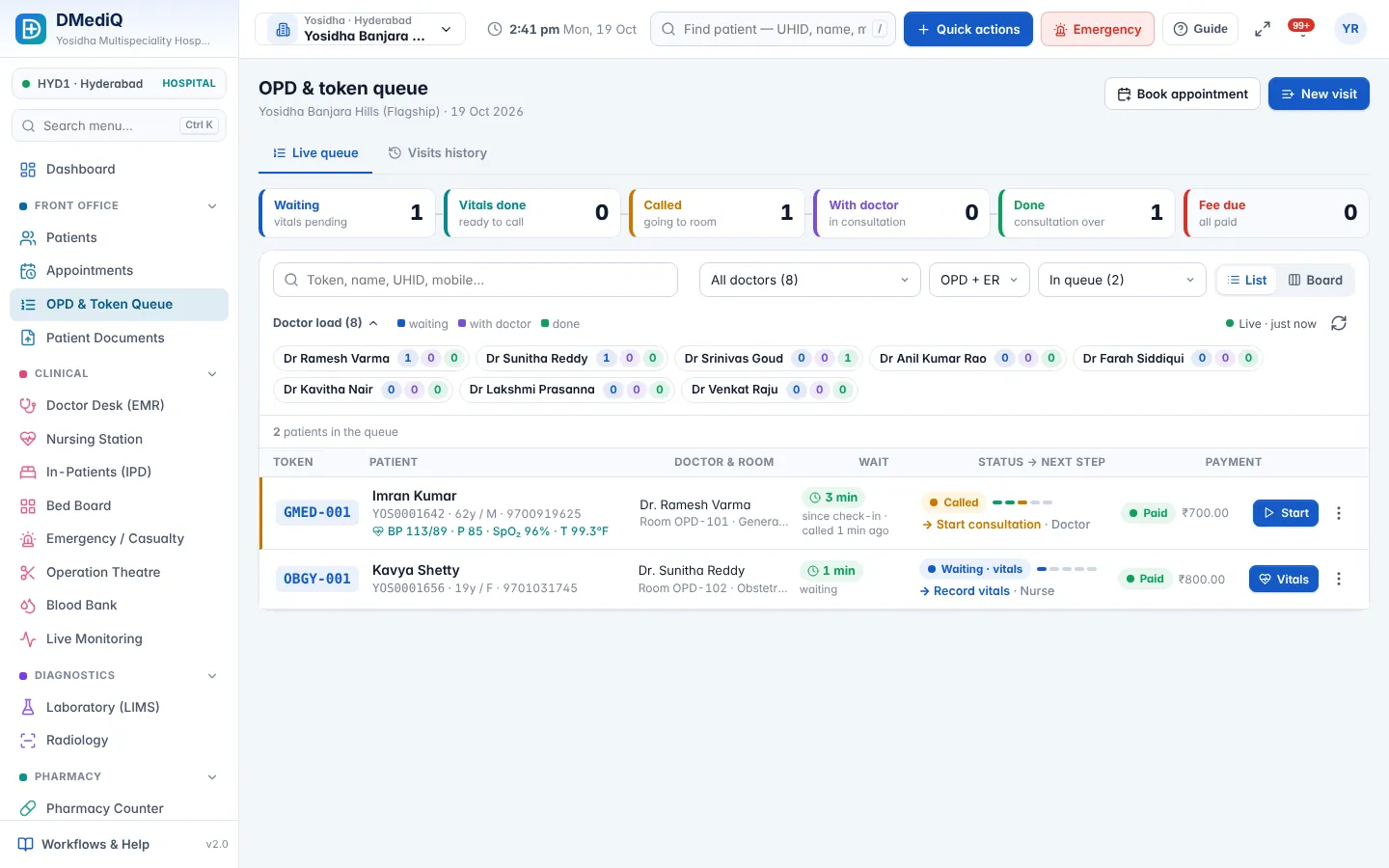
OPD & Appointments
OPD Management & Appointment Scheduling Software
Book, check in, triage and call patients in order — with live doctor load and zero confusion at the front desk.
- Doctor schedules & slots
Weekly timings, leaves and slot length per doctor; double-booking is blocked. - Token queue
Waiting → vitals → called → with doctor → done, with live counts and per-doctor load. - Self check-in kiosk
Patients check in on a touchscreen; the token prints and the queue updates. - TV token display
Show the now-serving token for each room on any TV browser.
EMR & Doctor Desk
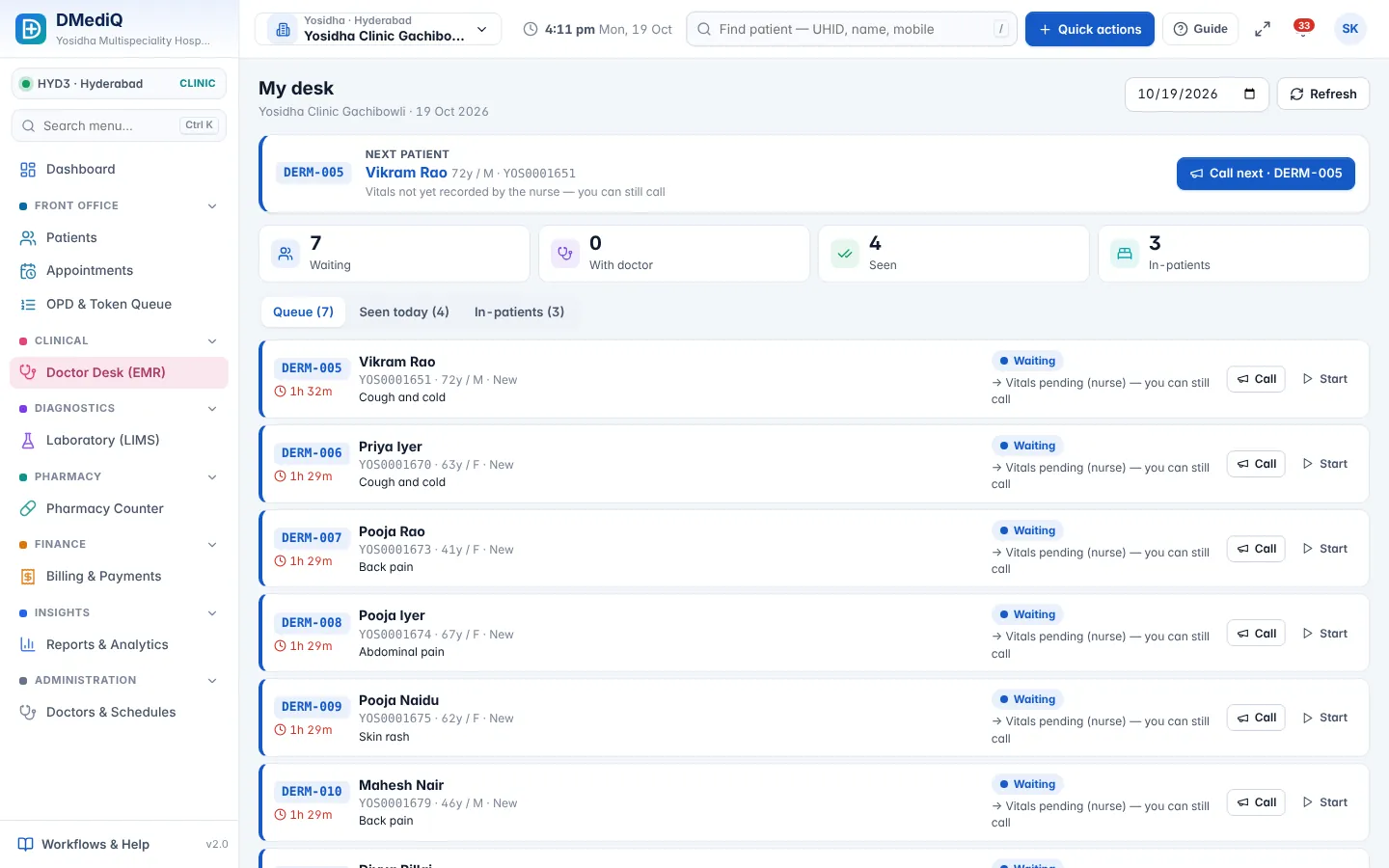
EMR Software — Electronic Medical Records for Doctors
Give doctors one screen with the full patient history, quick templates and e-prescriptions that print in seconds.
- Speciality templates
Chief complaints, examination and advice templates for each speciality — or build your own. - ICD-10 diagnosis
Searchable ICD-10 codes for clean records, reports and insurance claims. - e-Prescription
Drug search with strength and frequency, favourites, interaction hints and multi-language print. - Orders & results
Order lab, radiology and procedures; results come back into the same record.
IPD, OT & Emergency
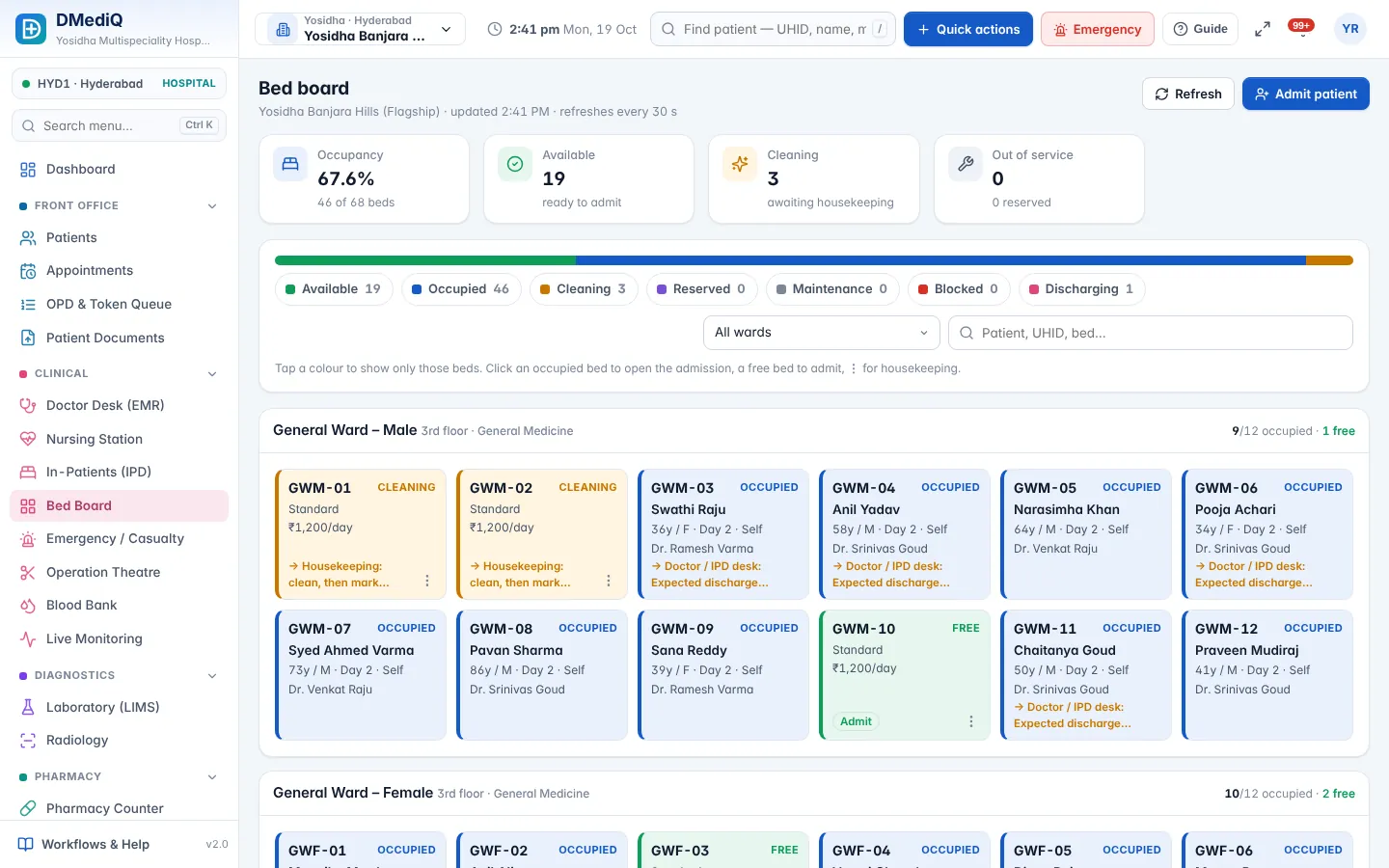
IPD, Bed Management, OT & Emergency Software
See every bed, every surgery and every emergency case in real time — and discharge faster with complete bills.
- Admission & bed board
Admit from OPD or emergency, choose ward and bed, collect advance and attach the insurer. - Nursing station
Medication rounds, vitals charts, intake/output and nursing notes by shift. - Operation theatre
OT calendar, surgeon/anaesthetist teams, checklists and live stages from pre-op to recovery. - Emergency & triage
Colour-coded triage, MLC details, quick registration and shift to ICU or ward.
Who it's for
Right-sized for every healthcare facility
Multi-speciality hospitals
Every department connected — OPD, IPD, OT, ICU, lab, radiology, pharmacy, billing and TPA.
Hospital chains & groups
Central masters and pricing, branch-scoped staff, group dashboards and inter-branch transfers.
Nursing homes & small hospitals
Start with OPD, IPD, pharmacy and billing; add modules as you grow.
Clinics & polyclinics
Appointments, queue, EMR, prescriptions and billing on any device.
Diagnostic centres & labs
LIMS, radiology, home collection and secure report delivery.
Pharmacies
Counter sales, purchase, batch and expiry, and prescription dispensing.
Specialities
Templates and workflows for 22 specialities
Doctors get speciality-specific EMR templates, orders and packages out of the box.
- Cardiology
- Orthopaedics
- Obstetrics & Gynaecology
- Paediatrics & Neonatology
- General Medicine
- General Surgery
- Ophthalmology
- ENT
- Dermatology & Cosmetology
- Dental
- Nephrology & Dialysis
- Oncology
- Neurology & Neurosurgery
- Urology
- Gastroenterology
- Pulmonology
- Psychiatry
- Physiotherapy & Rehab
- IVF & Fertility
- Emergency & Critical Care
- Diagnostics & Imaging Centres
- Multi-speciality Hospitals
Why DMediQ
Built for real hospital floors
Any device
Responsive on desktop, tablet and phone. Kiosk self check-in and TV token boards included.
Any country
Currency, tax (GST/VAT/sales tax), time zone, ID types and phone formats for 76 countries. English, Hindi and Arabic.
Privacy by design
Role-based access, audit trail, consent records, field encryption, 2-factor login and data-subject requests.
Multi-branch
Branch-scoped staff, central masters, per-branch prices and stock, group dashboards.
Live monitoring
Bedside devices over HL7/FHIR, NEWS2 early warning and alarms at the nurses' station.
Fast onboarding
12-step setup wizard with Excel/CSV import, page guides on every screen and an Easy view for new users.
Onboarding
Live in 4 simple steps
- Day 1
Discover
We map your departments, branches and workflows.
- Day 2–5
Configure
Branches, doctors, services, prices and stock imported from your Excel sheets.
- Week 2
Train
Role-wise training; page guides on every screen.
- Week 2–3
Go live
Branch-by-branch launch with support on call.
Mobile ready
The same hospital in your pocket
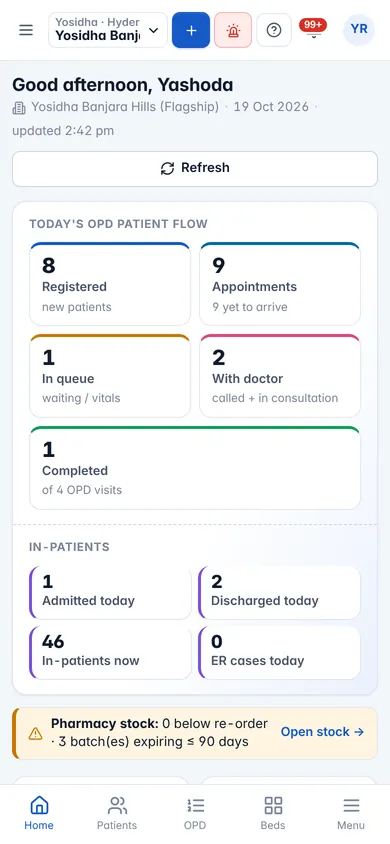
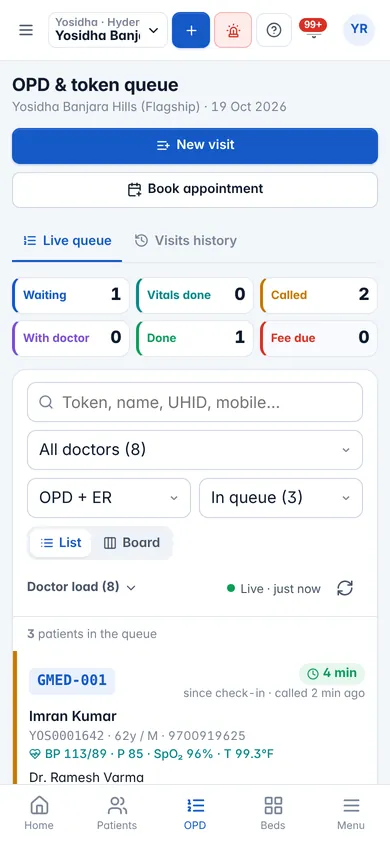
Doctors check the queue between rounds, owners see collections on the go and nurses chart at the bedside — no separate app to install.
- Installable as an app (PWA) on Android and iOS
- Large touch targets with Easy view
- Bottom navigation for one-handed use
FAQ
Frequently asked questions
What is DMediQ?
DMediQ is a cloud hospital management system (HIS) with EMR, OPD, IPD, OT, emergency, laboratory (LIMS), radiology, pharmacy, inventory, billing, insurance/TPA, patient engagement and live patient monitoring in one platform.
Which devices does it work on?
Any modern browser on Windows, macOS, Linux, Android and iOS — desktops, laptops, tablets and phones — plus touchscreen kiosks and TV displays.
Can it be used outside India?
Yes. Currency, tax (GST, VAT, sales tax), time zone, financial year, ID types and phone formats are configurable for 76 countries, with English, Hindi and Arabic interfaces.
How do we move from our current software?
The setup wizard imports your masters from Excel/CSV with a preview before saving. Our team helps migrate patient data and trains your staff.
Is patient data secure?
Data is encrypted in transit and sensitive fields at rest, access is role-based with audit logs and two-factor login is available.
Can we see a demo?
Yes — book a free demo and we will walk you through DMediQ with sample hospital data for your speciality.